Posted on by Ameno
Welcome to Thursday guides series!
Did you know that certain game actions can be set in the game via special links?
Today we’ll make a small recap of the links that are not explicitly visible in the game, but you might find handy.
Important note: All links that will be given in this article are set for beta Shores of War gameworld. In order to use it on your gameworld, you’ll need to replace first part: https://beta.travian.com/ with your gameworld link.
For example, if you play on Europe 30, your links should start with https://ts30.x3.europe.travian.com/
Position details
Action: Opens tile overview with inserted coordinates (100|-10) in this example.
Marketplace
Action: Opens marketplace with inserted coordinates (100|-10)
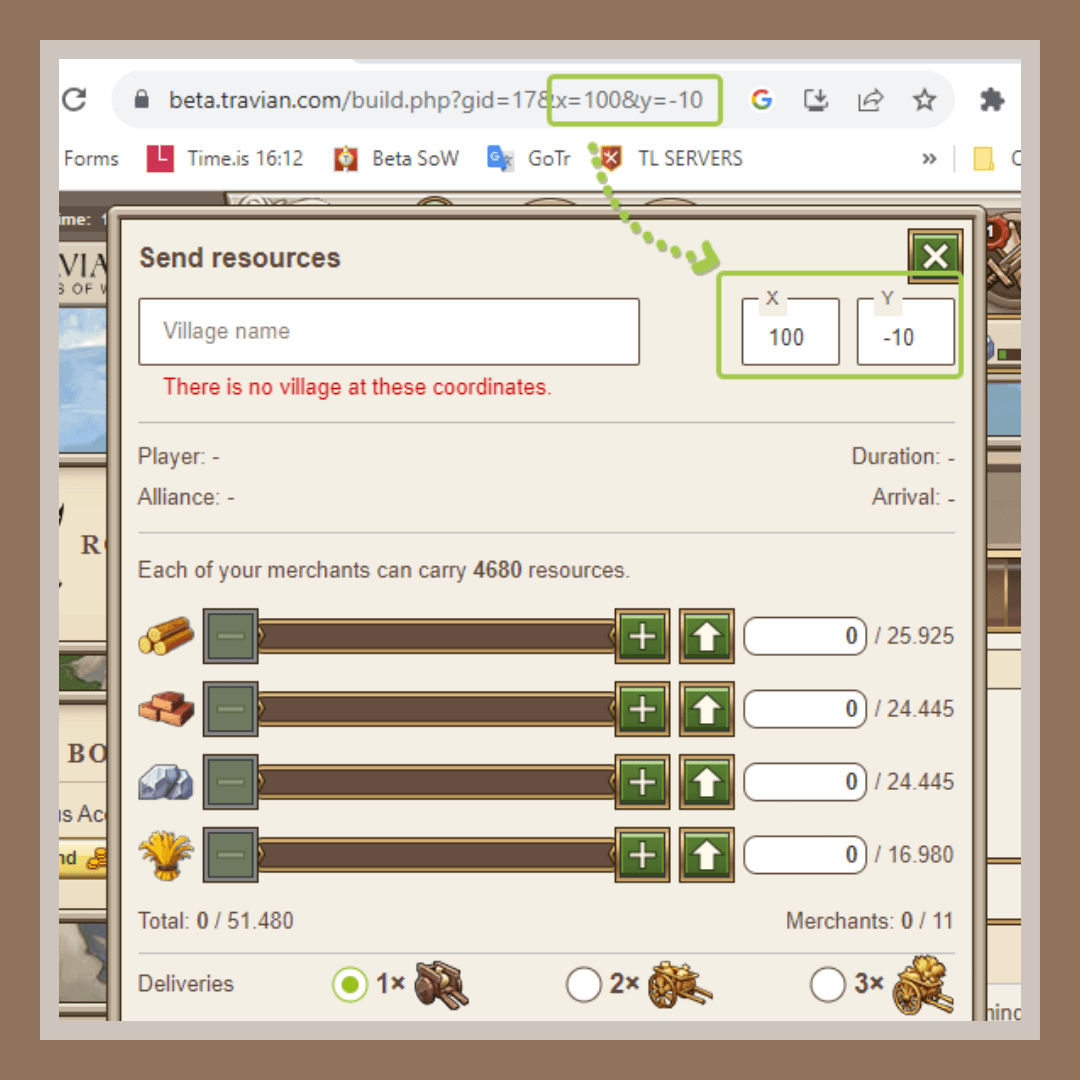
Send troops
Action: Opens “send troops” window with inserted coordinates (100|-10). This link doesn’t contain pre-selected troops in there and opens with a default troop movement type (Reinforcement)
Send exact troops
Action: Opens rally point -> Send troops window with inserted coordinates (100|-10), pre-selected movement type (Attack: Normal) and troops: 19x tier 1 [t1] units and 1x catapult [t8]).
The troop tiers, numbers etc can be adjusted to whatever you need by adding/replacing needed troop tiers and values in this part: &troop[t1]=19&troop[t8]=1
- [t1] – first (base) unit of any tribe. i.e Clubswinger, Phalanx, Legionnaire etc
- [t2] – second unit
- [t3] – third etc
… - [t7] – rams
- [t8] – catapults
- [t9] – settlers
- [t10] – chiefs
- [t11] – hero
For example, if you want to send 20000 clubswingers, 5000 Teutonic Knights, 2000 rams, 700 catapults and a hero, this part of the link will look like this:
troop[t1]=20000&troop[t6]=5000&troop[t7]=2000&troop[t8]=700&troop[t11]=1
The type of movement is adjusted in eventType part
- eventType=2 – Reinforcement
- eventType=3 – Attack
- eventType=4 – Raid
Redeploy hero
Action: The link allows to redeploy hero to the needed coordinates. Some players add this to their link list when they often move hero between the villages.
Gold club feature ~ Trade route
Action: Allows to fill trade routes (only for gold club users) with one link. The link contains target village, pre-selected resources, delivery settings
Link variables:
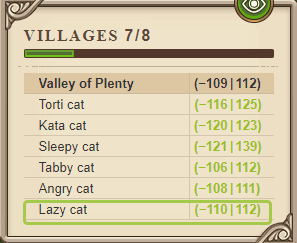
- did_dest – village ID (you can find it by selecting a village in your village list or in map.sql file)
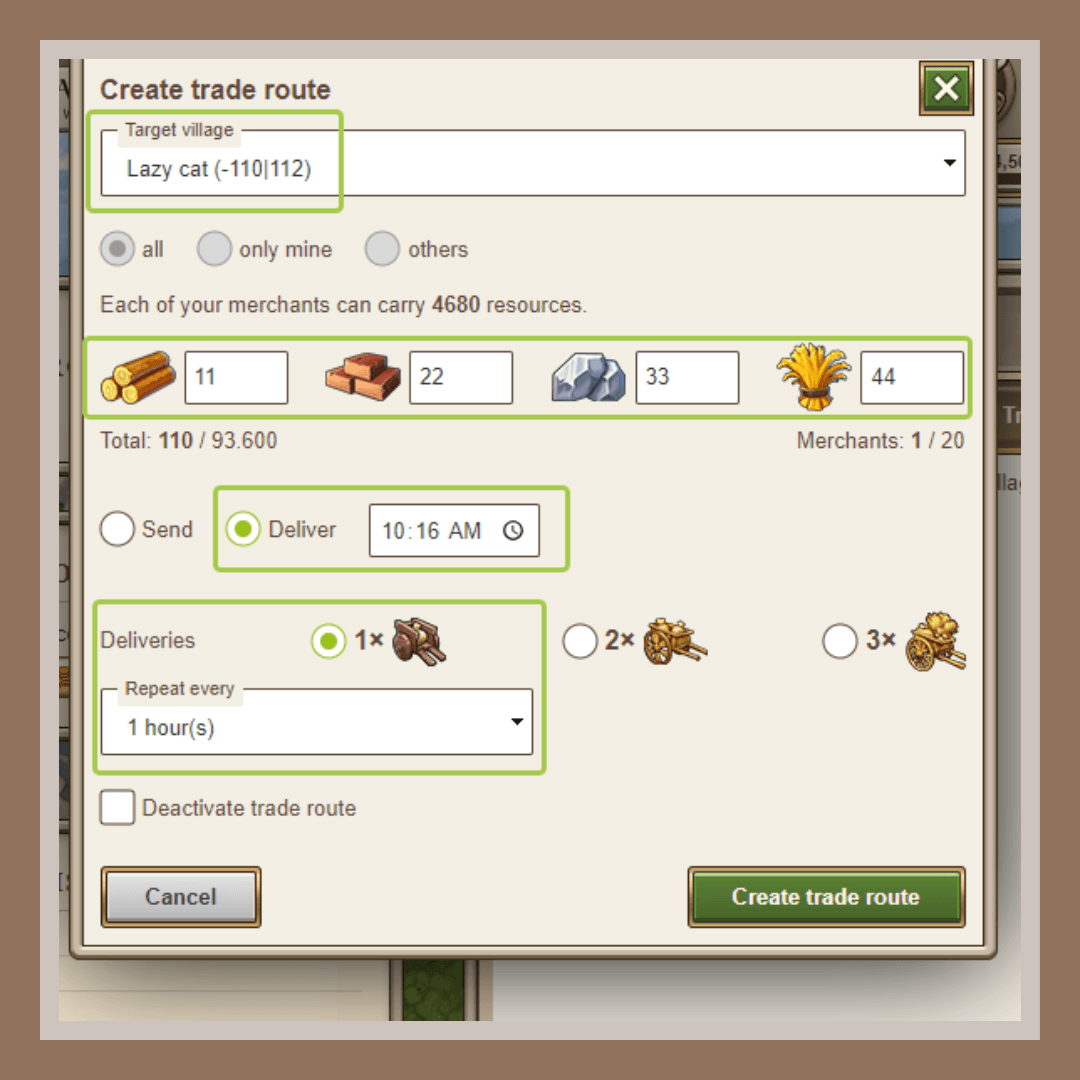
- r1-lumber, r2-clay, r3-iron, r4-crop
- trade_route_mode=deliver – sets trade route mode on deliver at (time). Another option is =send
- hour=10&minute=16 Sets time when trade route should deliver resources (you need to use 3, but not 03, 0 and not 00 etc. here for hours and minutes).
- &repeat=1 Repeats trade route 1 (2, 3) times
- &every=1 Sets trade routes that start every 1 (2, 3, 4, 6, 8, 12, 24) hours
In this example it will set trade route that arrives at 10:16 server time, with 11 lumber, 22 clay, 33 iron and 44 crop. Trade route will be set to repeat every 1 hour (meaning, it’ll create 24 trade routes in total), and will deliver resources once per route.
And that is a wrap! Do you know some other useful in-game links that help you perform actions? Share them with us in our official Discord! Come back next Thursday for more tips and tricks about how to play Travian: Legends!